

Saved Replies are a powerful time-saving tool in app.chitchatbot.ai that lets you store and reuse frequently sent messages—such as greetings, support answers, or follow-ups—directly from your Inbox. With this feature, you can respond faster, stay consistent, and keep customer communication professional and efficient.
✅ What Are Saved Replies?
Saved Replies are pre-written, reusable messages that can be inserted into any conversation with just a few clicks. They’re ideal for handling frequently asked questions, repetitive interactions, or standard responses—helping your team stay productive without sacrificing quality.
✍️ How to Create and Use Saved Replies
Follow these steps to create and insert Saved Replies:
To Create a Saved Reply:
- Navigate to the Inbox.
- Click on the Saved Replies icon (represented by a speech bubble or message icon).
- Click “Add New”.
- Enter a shortcut (e.g.,
/greeting) and the message content you want to save. - Click Save.
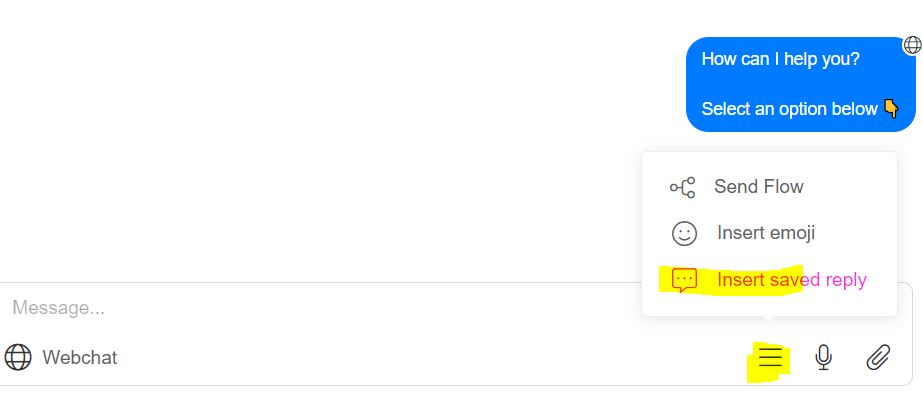
To Use a Saved Reply:
- While typing in the inbox chat box, simply type forward slash
/or click Insert Saved Reply - A list of your saved replies will appear. Select the appropriate one and it will be inserted instantly into the chat.
💡 Real-World Use Cases
Saved Replies can be used across a range of common business scenarios:
- Customer Service: “Hi! Here’s our return policy…”
- Sales Support: “Thanks for your interest! Here’s our product catalog.”
- Appointment Confirmations: “Your booking is confirmed for {date} at {time}.”
- Order Updates: “Your order has been shipped and is on its way!”
- Feedback Requests: “We’d love to hear your thoughts—please leave a review.”
🎯 Best Practices for Using Saved Replies
- Personalize When Possible
Use placeholders like{name}or{order_number}to make messages feel tailored to each user. - Name Replies Clearly
Use intuitive shortcuts (like/faq,/hello, or/orderupdate) to quickly find what you need. - Keep Replies Updated
Review saved replies regularly to ensure they’re still relevant, accurate, and aligned with your latest business processes. - Use Sparingly in Conversations
Don’t rely solely on Saved Replies. Combine them with personalized messages to maintain a human, authentic tone.
⚠️ Common Pitfalls to Avoid
- Outdated Content: Always double-check saved replies for current links, prices, or policy details.
- Overuse: Using too many canned messages can make interactions feel impersonal or robotic.
- Lack of Organization: Without clear naming or categorization, Saved Replies can become hard to manage as your list grows.


