Telegram has introduced a powerful new feature for Telegram Premium and Business users—you can now connect your Telegram account directly to a bot and automate conversations in your private chats.
This means you can respond to customers automatically via your bot, while still keeping the experience personal and seamless. Subscribers won’t even notice a difference!
Perfect for businesses looking to enhance customer service, reduce response time, and maintain consistent communication with clients.
⚙️ Setup Guide
✅ Step 1: Enable Business Mode for Your Bot
-
Open Telegram and search for @BotFather.
-
Enter the
/mybotscommand. -
Select your bot from the list.
-
Click Bot Settings > Business Mode > Turn On
-
Toggle Business Mode ON.
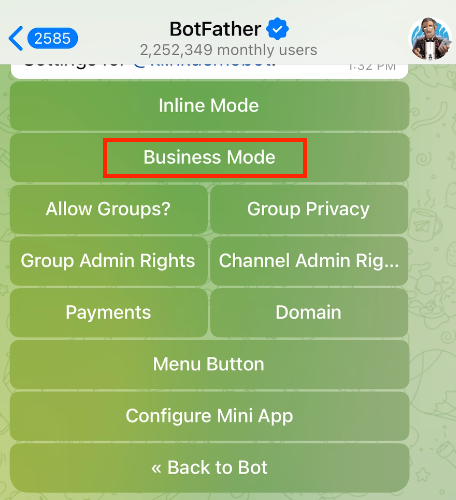
✅ Step 2: Link the Bot to Your Telegram Premium Account
-
Open Telegram and go to:Settings > Telegram Business > Chatbots
-
In the input field, type your bot’s username or bot link.
-
When your bot appears in the dropdown, click Add.
-
Choose how you want your bot to access your chats:
🔓 Option 1: All 1-to-1 Chats
-
Gives the bot access to all private messages you receive.
-
Best for businesses wanting full automation across all incoming messages.
🔐 Option 2: Only Selected Chats
-
Allows you to grant access only to specific contacts or groups.
-
Use this for more control over which conversations are automated.
-
In the Included Chats section, you can add:
New chats
-
Saved contacts
-
Unsaved contacts
-
Specific groups
💡 Pro Tips
-
Your customers will still feel like they’re chatting with you—while your bot does all the work behind the scenes.
-
You can build your flows on ChitChatBot.ai and handle everything from FAQs to lead capture and follow-ups.
-
Don’t forget to monitor performance and adjust your automation based on customer feedback.