AI Agents can read documents to provide more accurate, business-specific answers to your customers. By uploading files, you can teach your agent how to respond with the right information.
👉 You can attach multiple files to the same AI agent.
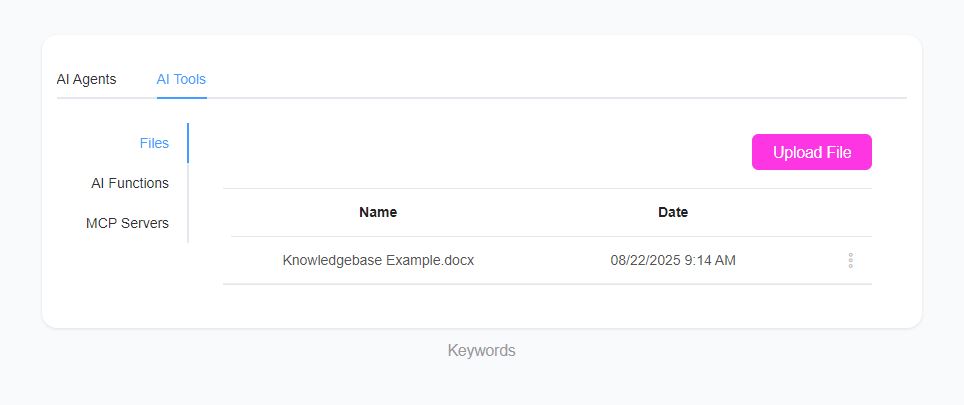
Step 1: Upload a File
-
Go to AI Center → AI Tools → AI Files.
-
Upload your document.
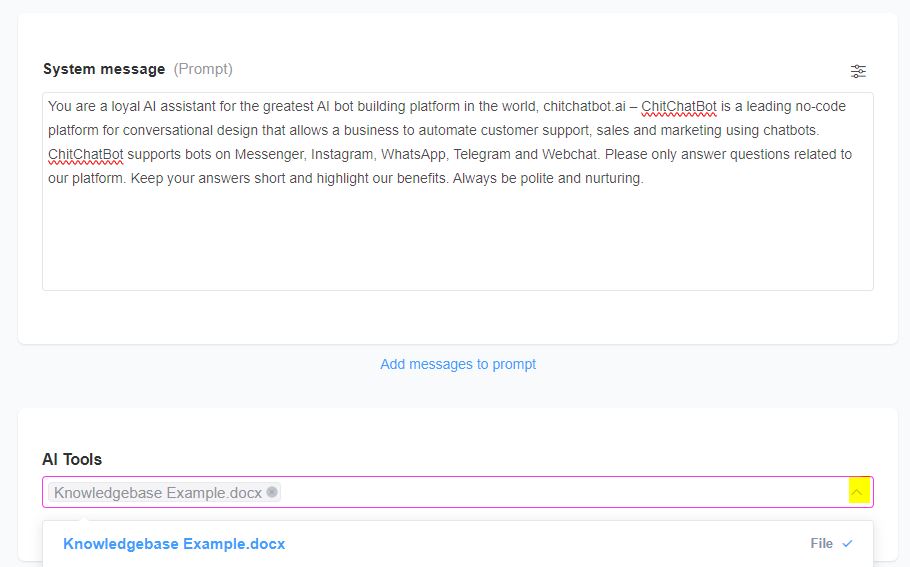
Step 2: Attach File to an AI Agent
-
Edit the AI Agent you want to enhance.
-
In the AI Tools section, select the file(s) you uploaded.
Supported AI Providers
- Currently, file support works only with OpenAI integration.
Supported File Types
You can upload the following formats:
- PDF, CSV, DOCX, DOC, JSON, PPTX, TXT
Additional details:
-
Max file size in ChitChatBot: 25 MB
-
OpenAI direct upload limit: 512 MB
If your file is larger than 25 MB, upload it directly to OpenAI and contact our support team for assistance.