ChitChatbot allows you to perform not just basic calculations like addition, subtraction, multiplication, and division, but also advanced mathematical and scientific calculations. Let’s walk through how to do this and what operators, functions, and constants you can use.
How to Perform Calculations
-
Choose the FlowSelect the flow where you want to include the calculation.
-
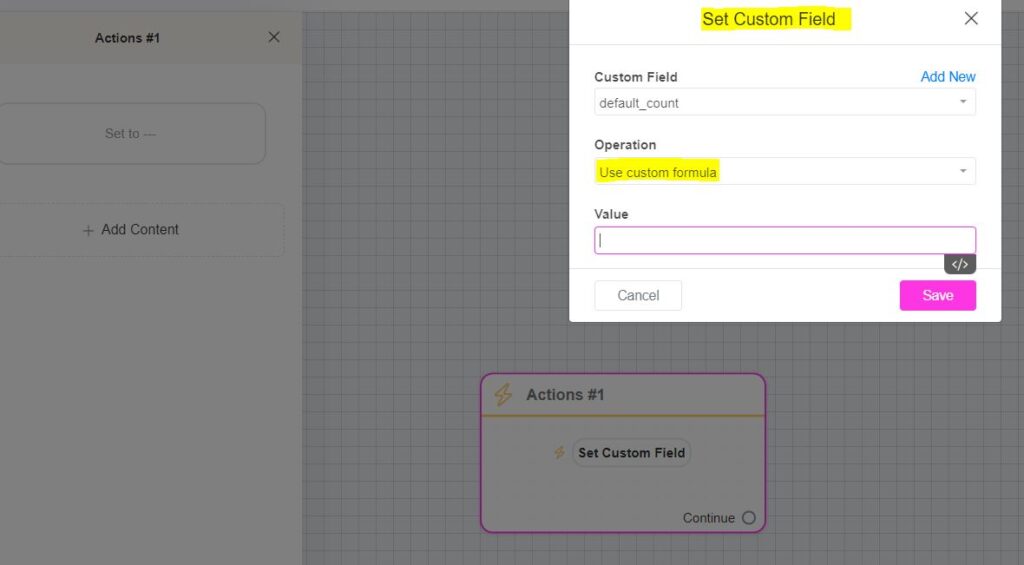
Add an ActionIn the block builder, select Action → Set Custom Field.
-
Set Up the Custom Field
Choose the existing custom field (where you want to store the result).
-
In the operation settings, choose Use custom formula.
-
In the Value field, enter your desired formula.
-
SaveClick Save to apply the changes.
Example: Calculating (A + B) * (A – B)
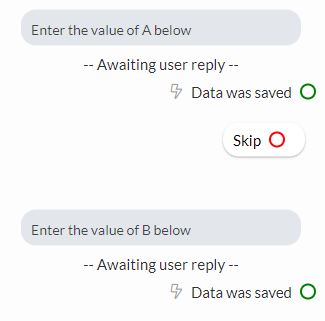
Suppose you want to calculate (A+B)×(A−B)(A + B) \times (A – B)(A+B)×(A−B), with A and B as custom fields filled from user input.
-
Step 1: Ensure A and B are already stored in custom fields (e.g.,
{{value a}}and{{value b}}). -
Step 2: Create a new custom field (e.g.,
calculation_value) to store the result. -
Step 3: In the Set Custom Field action, use this formula in the Value field:
({{value a}} + {{value b}}) * ({{value a}} - {{value b}}) -
**Example Calculation:**If A = 4 and B = 2:(4+2)×(4−2)=6×2=12(4 + 2) \times (4 – 2) = 6 \times 2 = 12(4+2)×(4−2)=6×2=12.The bot will show
12as the result.
Examples of Basic and Complex Math Expressions
-
1 + 2 * 3 - 4 -
pi * 2 -
abs(1) + min(1, 2) * max(1, 2, 3) -
min(1 + 2, abs(-1)) -
1 + ((2 - 3) * (5 - 7)) -
2 * (-3)
Allowed Formats and Syntax
-
1→ a simple number. -
(1 + ((2)))→ nested brackets are allowed. -
00001→ leading zeros are fine. -
.1→ zero before the decimal point can be omitted.
Operators
Functions
Constants
Other Syntax
Tips for Best Results
✅ Always store numerical inputs in custom fields as numbers (not text).✅ Test your formula on small examples to ensure accuracy.✅ For advanced calculations, break them into smaller formulas for better readability and maintainability.