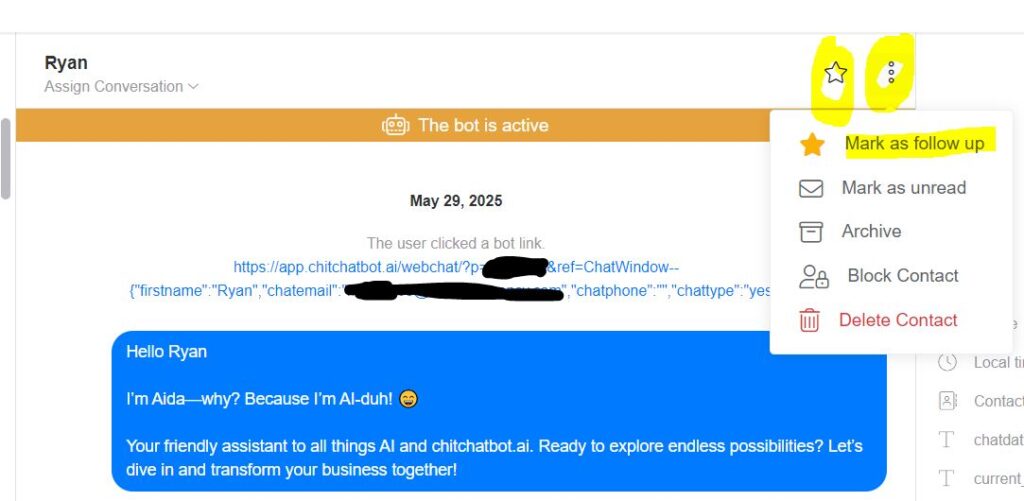
🔹 In the Inbox:
-
Navigate to the Inbox tab to view all conversations.
-
Select the conversation you want to mark for follow-up.
-
Click on the menu (three dots or options icon).
-
Choose Mark as follow-up from the dropdown list.
🔹 In the Flow Builder:
-
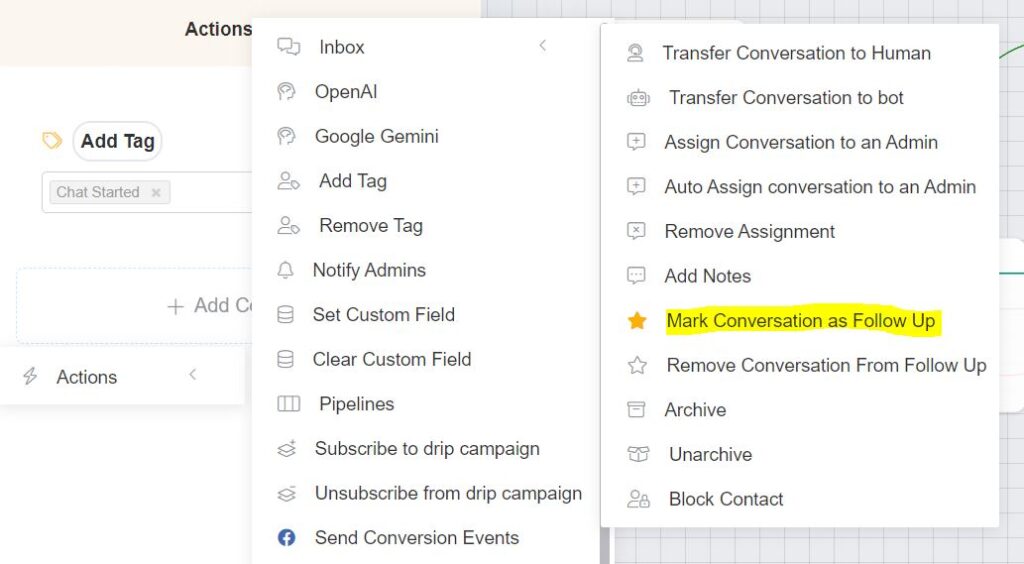
In the Flow Builder, select the point in the flow where you’d like to mark the conversation for follow-up.
-
Create an Action block.
-
Select Inbox actions.
-
Choose Mark conversation as follow-up to automatically mark the conversation at that stage of the flow.
Practical Tips
✅ Use Follow-Ups for Priority TasksFlag conversations that require additional action, whether it’s scheduling a call, clarifying a query, or completing a task.
✅ Combine with Pipelines, Tags or NotesFor better organisation, use pipelines, tags or notes alongside follow-ups. This helps you keep track of why a follow-up is needed and any relevant details. You can filter contacts who have been starred/marked as “Follow Up”, however if setup pipelines will provide more detailed insights and greater control over leads management.
✅ Review Follow-Ups RegularlyMake it a habit to check your marked follow-ups to ensure no critical interactions slip through the cracks.