Formatting date and time is crucial for serving customers in different regions, as date and time formats vary across countries and cultures. ChitChatbot makes it easy to customize how your bot displays dates and times to match your users’ preferences.
Here’s a step-by-step guide to help you set up date and time formatting within your flows:
Step 1: Choose the Flow to Edit
Navigate to the flow where you want to format a date or time.
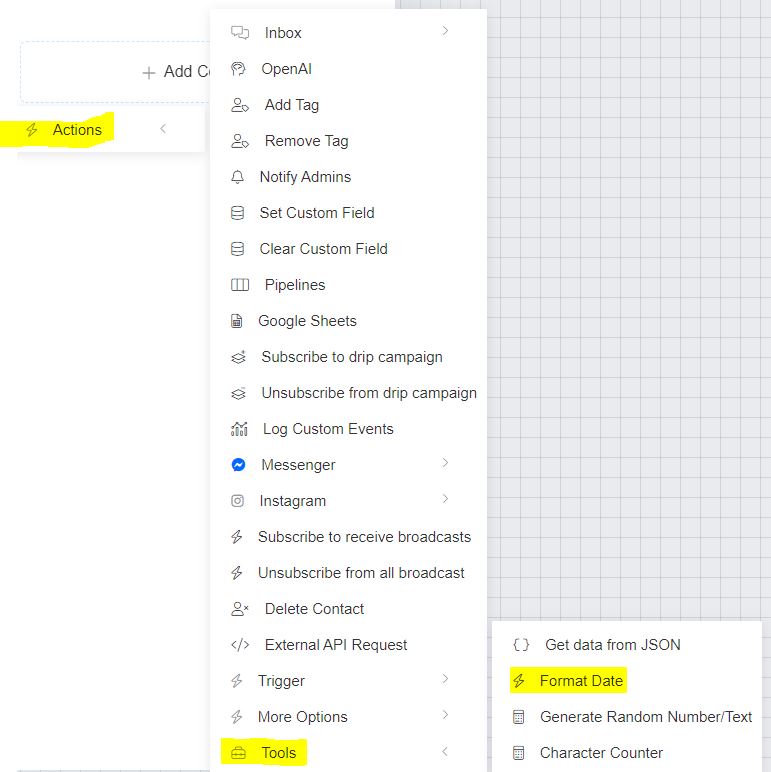
Step 2: Add the Action
In the flow’s block builder:
-
Select the “Action” option.
-
From the list of actions, choose “Format Date / Date & Time”.
Step 3: Configure the Format
Within the Format Date / Date & Time action, do the following:
✅ Select the Date Field
- Choose the custom field containing the date you want to format.
✅ Enter the Desired Format
-
In the Format field, type the pattern you want to display.For example, to show the date and time as
23-01-2022; 02:00 a.m, enter:d-m-Y; h-i a -
Refer to the table below for all available formatting parameters.
✅ Save the Formatted Date
- Either create a new custom field or select an existing one in the “Save the formatted date to” field.
✅ Set the Time Zone
- You can choose whether to format the date in the page’s time zone or the user’s time zone.
Finally, click Save to apply these settings.
Formatting Parameters for Date & Time
**Note:**The
Uformat is particularly useful for math operations. For example, if you want to calculate how long a user takes to complete a quiz:({{stop}} - {{start}}) / 60This calculates the total time in minutes! This would be a maths operation.
Example Format
If you want to display:
23-01-2022; 02:00 am
You would use the format string:
d-m-Y; h-i a
Key Tips
✅ Double-check the time zone settings to ensure accurate local time for your users.✅ Store the formatted date in a separate custom field for easy use in your flows.✅ Use the formatting parameters creatively to suit your audience’s region and language.