Dynamic Multiple Choice lets your bot present questions and generate answer options dynamically using data from external sources like APIs or Google Sheets. This is especially useful for quizzes, surveys, or lead qualification. In most cases you won’t need dynamic options and you can simply type your individual choices manually.
How to Set Up Dynamic Multiple Choice
- Use “Get User Data”
In the Flow Builder, add a Get User Data step.
-
Set the reply type to Multiple Choice.
-
Store Options in a Custom Field
All options must be stored in a single custom field, for example:{{fitness_choice}}
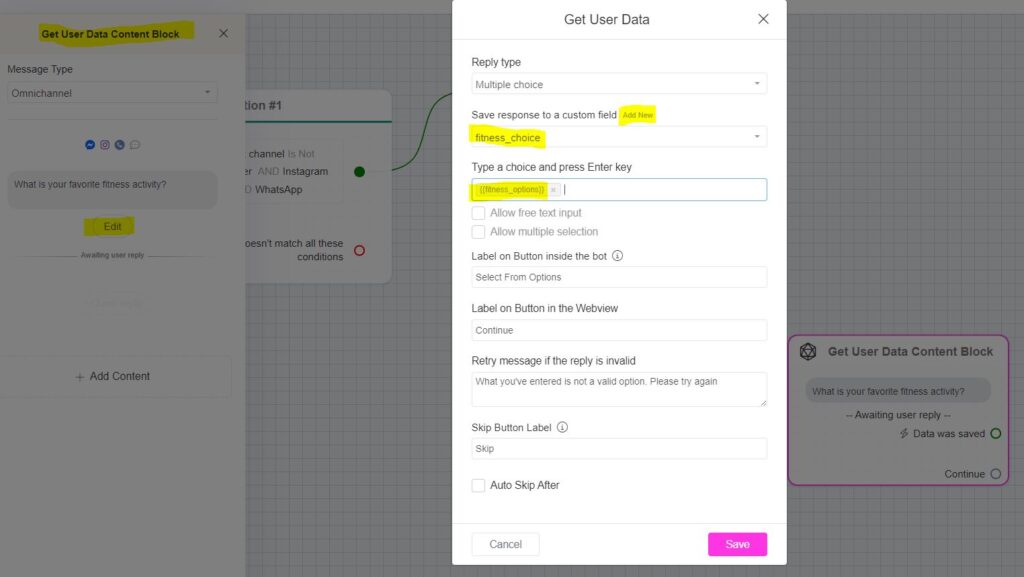
Formatting Your Options
Here’s how to format the data for your dynamic multiple choice options:
1️⃣ Options from Google Sheets
Example question: “What’s your favorite fitness activity?”Options: Weights, Running, Yoga, CyclingFormat:
Weights, Running, Yoga, Cycling
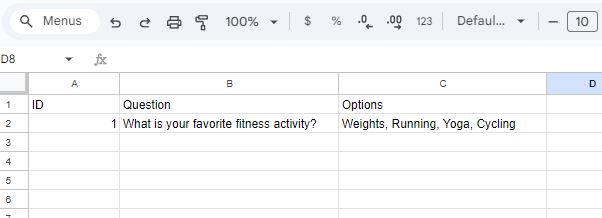
You can pull this list directly from Google Sheets or any source that supports comma-separated values.
2️⃣ Options from an API (Array Format)
If you’re using an API to generate options dynamically, use an array like this:
["Weights", "Running", "Yoga", "Cycling"]
In the API response, it might look like:
{
  "data": ["Weights", "Running", "Yoga", "Cycling"]
}
Use External Request to fetch data from your API, and Response Mapping to save the list to the custom field that stores the options.
Checking User Choices
-
Use Conditions to identify which option the user selected.
-
Personalize your bot’s responses using the selected choice, like:“Thanks! {{fitness_choice}} is something I enjoy too!”
Tips:✅ Dynamic options make your bot feel smarter and more relevant.✅ Great for quizzes, product recommendations, or personalized suggestions!