WhatsApp is one of the most popular messaging platforms worldwide, making it an essential tool for businesses to engage with customers. With ChitChatBot.ai, you can automate WhatsApp conversations, streamline customer interactions, and save time. This guide walks through everything you need to know about WhatsApp automation using ChitChatBot.ai — setup, use cases, and expert tips.
What You Need to Know Before Getting Started
WhatsApp Pricing Model
WhatsApp operates on a per-conversation pricing model, in addition to ChitChatBot.ai’s subscription fees. Costs vary by country and depend on whether the conversation is:
- Contact-initiated (within 24 hours)
- Business-initiated (outside 24 hours)
Every WhatsApp Business Account receives 1,000 free service conversations each month. When customers send a message from an ad that clicks to WhatsApp or a Facebook Page call-to-action button, that conversation is free for 72 hours. If you do not respond within 24 hours, a free entry-point conversation is not opened and you must use a template to message the customer.
If a customer sends a message, businesses have 24 hours to respond with a free-form (non-template) message. After the 24-hour window closes, businesses can only send messages using pre-approved templates.
Rules and regulations may change at any time. For more details, visit WhatsApp Pricing.
Meta Business Verification
- Contact-initiated conversations are available to all businesses
- Business-initiated conversations require Meta Business Verification
- You must have admin access to Facebook Business Manager
Choosing a WhatsApp Number
- The WhatsApp number you use must not be linked to an existing WhatsApp or WhatsApp Business account
- It’s recommended to use a new number specifically for business purposes
Using a Virtual Number
You can purchase a virtual phone number from services like:
- Sonetel
- YourBusinessNumber.com
- Twilio
These services provide virtual numbers from various locations, useful for international businesses. Some may require proof of identity, billing address, or business registration documents. Ensure the number supports SMS or call verification.
Connecting WhatsApp to ChitChatBot.ai
Steps to Connect
-
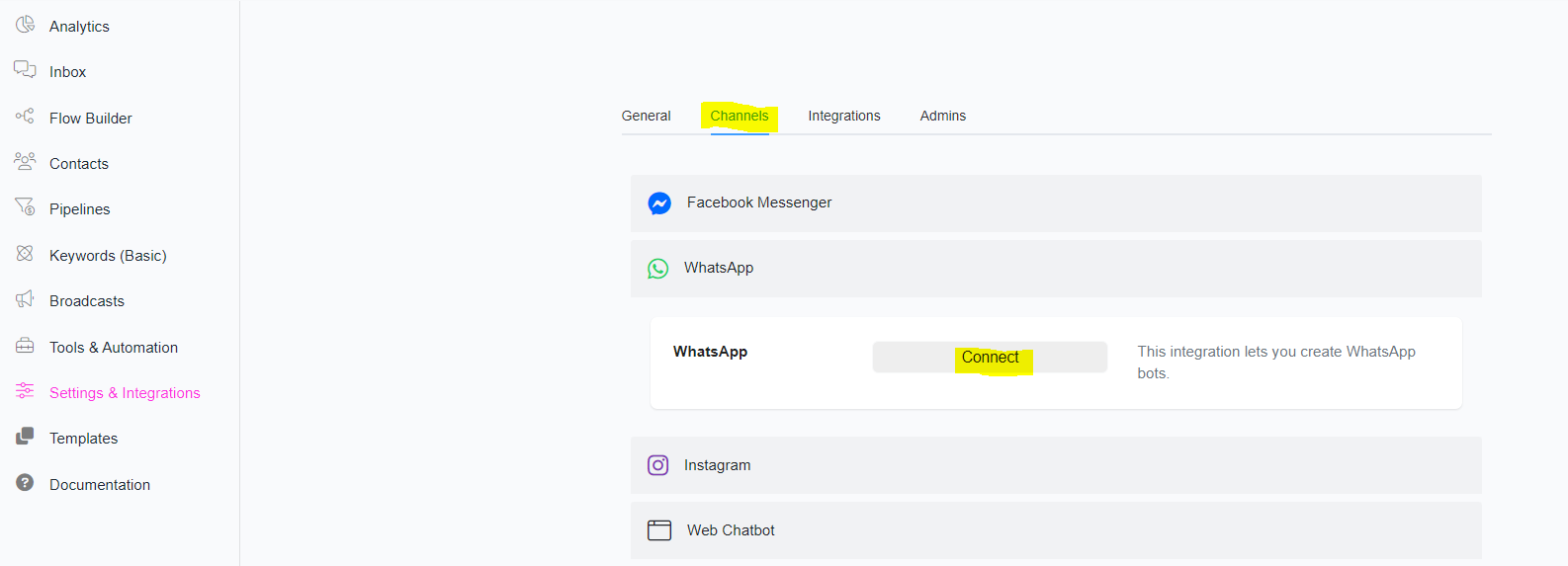
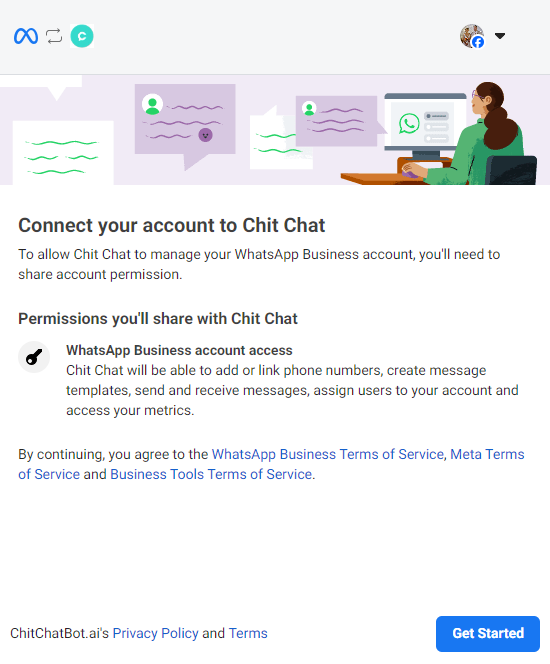
Create a New Bot or Add WhatsApp as a Channel. Use a personal account with full permissions.
-
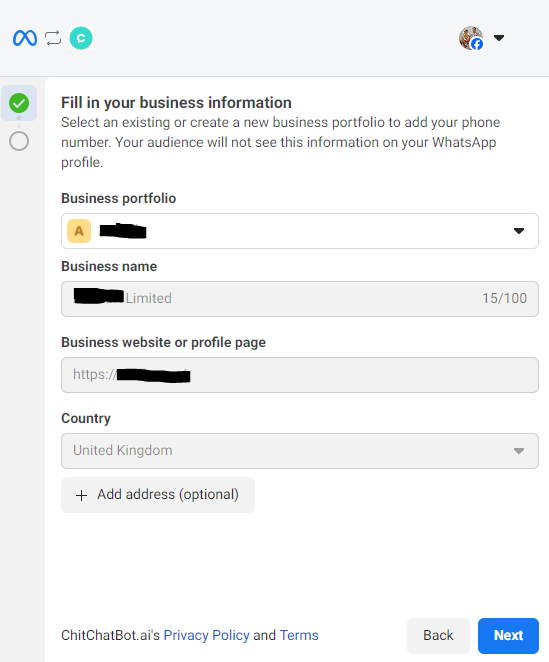
Choose a Business Manager. Select an existing (ideally verified) business manager account.
-
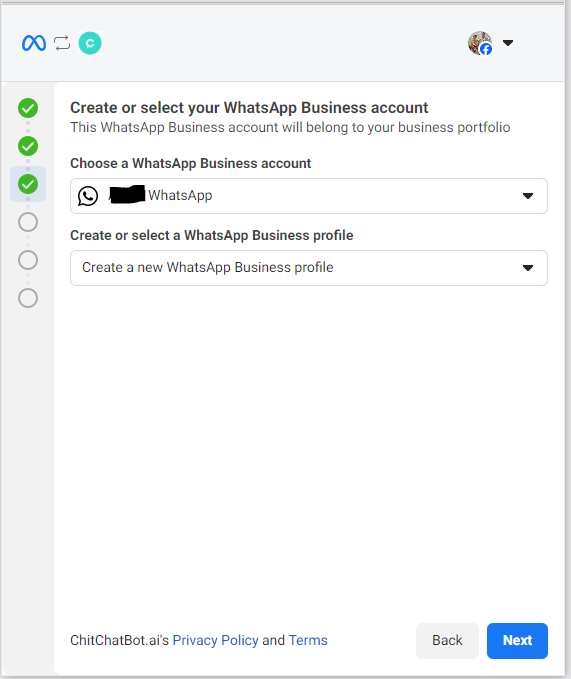
Create or choose an existing WhatsApp business account and select create a new profile. Ensure your display name follows Meta’s regulations (e.g. “Widgets Inc” is valid, but “Widgets WhatsApp” is not).
-
Select Your Business Category. Choose from Retail, Entertainment, Education, etc.
-
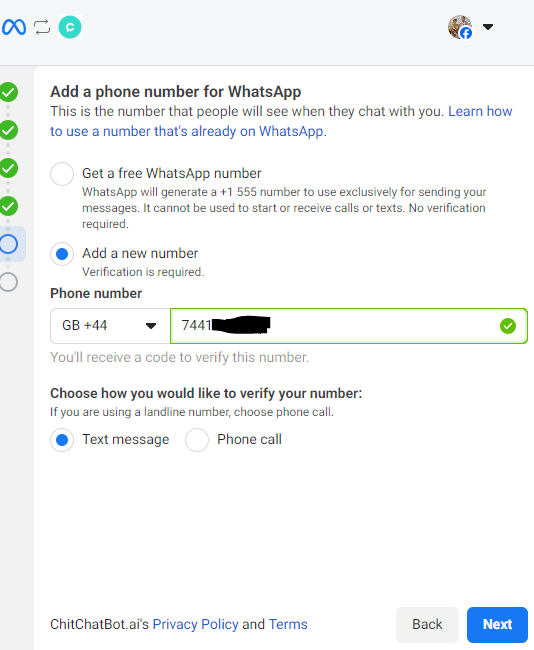
Add a New or Existing Number. Input and verify your phone number via SMS or call. If using a virtual number, the verification code may arrive via email.
-
Finalise the Connection. Click Continue and wait for Meta to verify your details. Click Finish and wait a few seconds for the connection to ChitChatBot.ai to complete.
Once connected, in the ChitChatBot.ai dashboard you can scan the QR code (click on the number to reveal it) to test your setup. Send a message and it should appear in your inbox.
You can also test by sending a message to your new number using
https://wa.me/447401123456(replace with your WhatsApp number).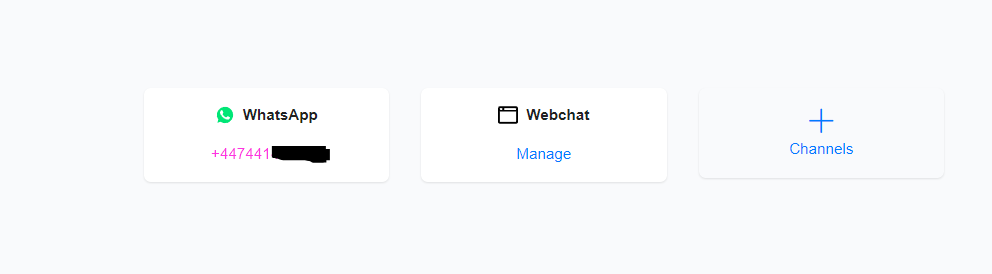
Building Your Chatbot
- Use the drag-and-drop chatbot builder to create workflows
- Utilise AI triggers for AI-powered conversations
- Customise the chatbot’s tone and language to match your brand
- When building chatbots for WhatsApp, create and use pre-approved templates — they’re the only way to initiate conversations with customers who haven’t interacted in 24 hours, ensuring compliance and enhancing user experience. Templates keep spam at bay and ensure WhatsApp remains a valuable messaging channel for your business with a 95% open rate.
What is WhatsApp Automation?
WhatsApp automation enables businesses to:
- Send automated messages
- Respond to customer queries instantly
- Manage conversations without manual intervention
Common Use Cases
- Welcome messages
- FAQs & customer support
- Order confirmations & updates
- Appointment scheduling
- Feedback collection & promotions
Expert Tips for WhatsApp Automation
- Keep messages concise. WhatsApp users prefer short, clear messages.
- Personalise your responses. Use customer names and tailor messages based on past interactions.
- Set clear expectations. Inform customers they’re chatting with a bot and provide human support options.
- Monitor performance. Regularly check chatbot analytics for improvements.
- Comply with WhatsApp policies. Follow WhatsApp’s guidelines to avoid account restrictions.
Meta Business Verification
To send business-initiated messages outside of 24 hours, Meta Business Verification is required.
Steps to Verify Your Business
- Go to Facebook Business Manager → Settings → Security Centre
- Select “Start Verification”
- Submit required documents (e.g. business licence, bank statement)
- Wait for verification approval (can take days or weeks)
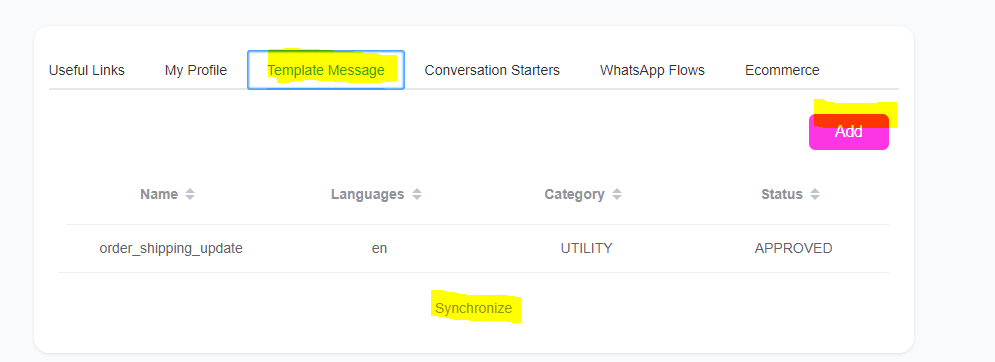
Once verified, you can create Message Templates under:
- Settings → WhatsApp → Manage → Template Messages → Add
- Always click “Synchronise” to pull approved templates into ChitChatBot.ai
Message Template Categories
- Marketing — promotions, discounts, business updates
- Utility — account/order notifications
After approval, you can re-engage customers via broadcasts and other tactics. Templates are approved very quickly — usually within minutes, but can take longer.
Troubleshooting Message Delivery Issues
- Failed WhatsApp messages will show “message failed to be delivered” in the ChitChatBot.ai inbox
- Common reasons for failure include:
- Payment issues — ensure payment details are added (always add a payment method)
- Quality rating — maintain high-quality messaging
Messaging Limits
Business-Initiated Conversations
Your messaging limit determines the number of business-initiated conversations you can start within 24 hours.
- Initial limit: 250 messages per 24 hours
- Higher limits: can increase to 1,000 messages by:
- Completing Business Verification
- Maintaining a high-quality rating
- Increasing engagement levels over time
Higher limits (e.g. 10K+) require automatic scaling based on performance.
Upcoming Changes to WhatsApp Pricing (July 2025)
Starting 1 July 2025, WhatsApp switches to per-message pricing instead of per-conversation charges.
- Utility templates within an open service window will be free
- Charges will apply per delivered marketing, authentication, and utility messages
For the latest pricing updates, visit WhatsApp Pricing.
| Metric | Description |
|---|---|
| All Conversations | Total messaging conversations between your business and users. A conversation includes all messages delivered within a 24-hour period. Can be business-initiated or user-initiated. |
| Free Conversations | Total WhatsApp conversations that are free of charge. Same 24-hour rule applies. |
| Free Tier Conversations | The first 1,000 messaging conversations per month that your account receives at no cost. |
| Free Entry-Point Conversations | Conversations free because they originate from specific entry points like ads that click to WhatsApp or Facebook Page CTAs. Only the first conversation is free, lasting three days. Subsequent conversations within that period are charged. User-initiated only. |
| Paid Conversations | Total WhatsApp conversations that incur a charge. Same 24-hour rule. |
| Approximate Conversation Charges | Estimated total charges for paid conversations. May vary slightly from invoices. Cost depends on the user’s country/region. |
Why It’s Worth It
WhatsApp automation with ChitChatBot.ai helps businesses:
- Provide instant customer support
- Automate sales, marketing, and engagement
- Improve efficiency and save time
Setting up WhatsApp is slightly more complex than Facebook Messenger and Instagram — WhatsApp requires verifying your business and phone number. Despite the extra effort, investing time in WhatsApp setup is highly worthwhile. With its high engagement rates and broad global reach, WhatsApp provides a secure and effective way to connect with customers, build stronger relationships, and enhance customer service. Businesses that leverage WhatsApp benefit from improved customer trust and higher response rates, making the initial setup effort well worth it in the long run.