Claude by Anthropic empowers your business to deliver 24/7 customer support with natural, intelligent conversations—while significantly reducing costs and support workloads.
By integrating Claude into Chitchatbot.ai, you can create a smart, responsive chatbot that answers customer questions instantly across all channels.
🚀 Why Use Claude for Customer Service?
-
✅ Instant Responses: Provide immediate answers, even outside working hours.
-
✅ Reduced Costs: Save on staffing while maintaining quality service.
-
✅ Scalable: Handle thousands of conversations simultaneously.
-
✅ Customizable Knowledge: Train Claude with your business-specific prompt to ensure accurate, on-brand responses.
🧠 The heart of your Claude chatbot is your prompt (Business Info). Craft it carefully—your chatbot is only as good as your instructions!
🔗 Step 1: Connect Claude to Chitchatbot.ai
-
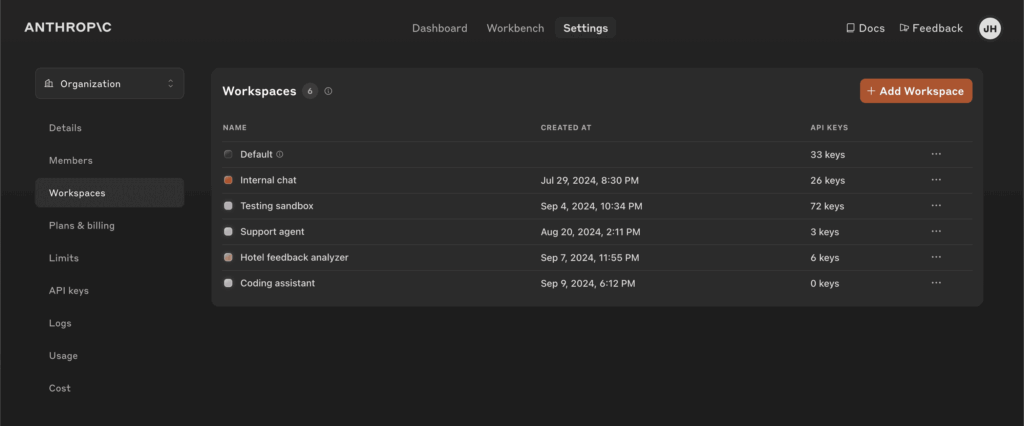
Get Your Claude API KeyGo to Anthropic Console →Generate and copy your API key.
-
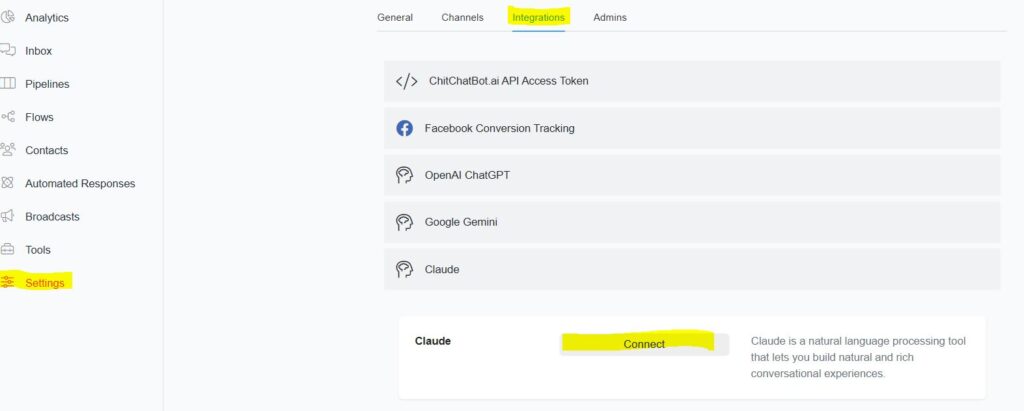
Log into Chitchatbot.aiNavigate to Settings > Integrations > Claude
-
**Click “Connect”**Paste your Claude API key and click Continue to complete the setup.
🤖 How Claude Responds to Messages
Once connected, Claude becomes your chatbot’s default responder after any basic automation or keyword flows. No extra setup needed.
AI Automation Priority
Your chatbot processes user messages in the following order:
-
Keyword Automations / Flows
-
OpenAI (ChatGPT)
-
Claude (Anthropic)
-
Google Gemini
⚙️ How to Trigger Flows with Claude
Claude can be used to trigger specific flows via AI Triggers.📘 Learn how to use AI Triggers →
🧑💼 Transfer to a Human Agent
We’ve built a default AI trigger that listens for requests like “talk to a person” or “I need help from a human.” When triggered:
-
Bot automation stops
-
The conversation is routed to a live agent
💡 You don’t need to configure this—it’s enabled by default.
🔕 Disable Claude Autoresponses (Optional)
By default, Claude will automatically respond to user messages when keyword or OpenAI flows don’t apply.
To disable this:
-
Go to Settings > Integrations > Claude
-
Toggle off Automate Responses