Adding notes to contacts in app.chitchatbot.ai is a smart way to keep track of important details, follow-ups, or unique preferences. Whether you’re managing support conversations, sales leads, or simply staying organized, notes help ensure nothing gets overlooked. Here’s how to use this feature effectively.
Step-by-Step Guide to Adding a Note
-
Log in to app.chitchatbot.aiAccess your account and head to the Inbox where all your active conversations are listed.
-
Select the ContactFind the contact you’d like to add a note to. Use the search bar or scroll through your conversation list to locate them.
-
Open Contact DetailsClick on the contact’s name or profile icon to view their detailed profile and conversation history.
-
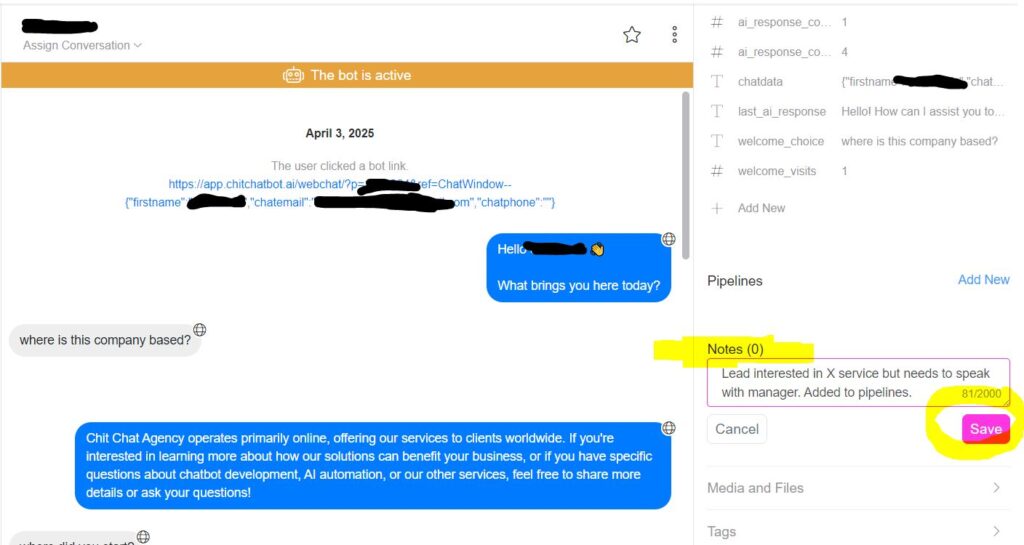
Add a NoteLocate the Add Note icon or section within the contact details. Click it to open a text box, enter your note, and then click Save to ensure it’s stored.
✏️ Quick Tip: Notes are visible to your team, so everyone stays aligned on updates and action items!
Real-World Use Cases
🔹 Customer Support:“Customer mentioned a payment issue on 10/10/2024—escalated to billing team. Transferred to customer support pipeline.”
🔹 Sales and Follow-Up:“Asked for more information about Product X. Schedule a follow-up call in 7 days.”
🔹 Personalization:“Prefers WhatsApp for communication—avoid email.”
Expert Tips
✅ Be Clear and Concise:Write short, actionable notes. Instead of “Follow up later,” use “Follow up on 15/10/2023 about Product Y.”
✅ Pipelines:We would recommended you utilise our pipelines feature, this also has a built-in notes feature but unlike notes you can move contacts between stages. Notes are useful for a quick important details, if someone else picks up the conversation they can quickly see these notes.
✅ Update Notes Regularly:Keep notes current as conversations evolve to ensure your team always has the latest info.
Common Mistakes to Avoid
⚠️ Writing Lengthy Paragraphs:Keep notes short and to the point for easy scanning.
⚠️ Not Saving Notes:Double-check that you’ve clicked Save so your notes aren’t lost.
⚠️ Sharing Sensitive Information:Be mindful of what you include in notes to stay compliant with data privacy regulations.