ChitChatbot allows you to perform not just basic calculations like addition, subtraction, multiplication, and division, but also advanced mathematical and scientific calculations. Let’s walk through how to do this and what operators, functions, and constants you can use.
How to Perform Calculations
Choose the Flow Select the flow where you want to include the calculation.
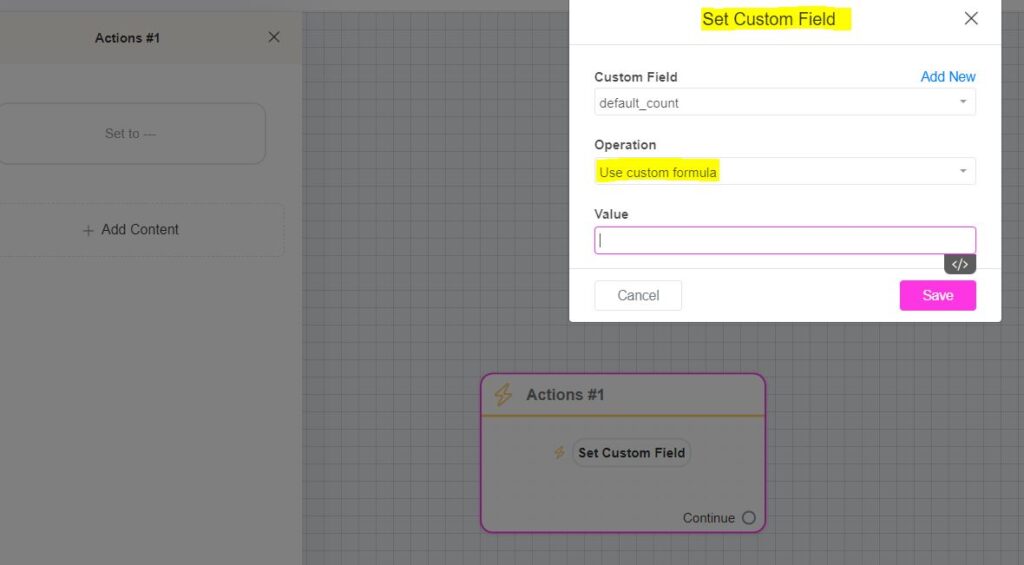
Add an Action In the block builder, select Action → Set Custom Field.
Set Up the Custom Field
Choose the existing custom field (where you want to store the result).
In the operation settings, choose Use custom formula.
In the Value field, enter your desired formula.
Save Click Save to apply the changes.
Example: Calculating (A + B) * (A – B)
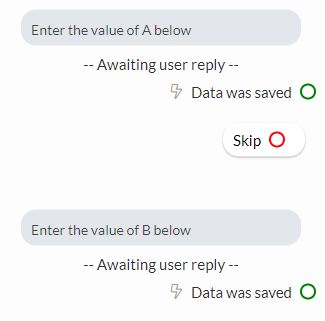
Suppose you want to calculate (A+B)×(A−B)(A + B) \times (A – B)(A+B)×(A−B), with A and B as custom fields filled from user input.
Step 1: Ensure A and B are already stored in custom fields (e.g., {{value a}} and {{value b}}).
Step 2: Create a new custom field (e.g., calculation_value) to store the result.
Step 3: In the Set Custom Field action, use this formula in the Value field: ({{value a}} + {{value b}}) * ({{value a}} - {{value b}})
Example Calculation: If A = 4 and B = 2: (4+2)×(4−2)=6×2=12(4 + 2) \times (4 – 2) = 6 \times 2 = 12(4+2)×(4−2)=6×2=12. The bot will show 12 as the result.
Examples of Basic and Complex Math Expressions
1 + 2 * 3 - 4
pi * 2
abs(1) + min(1, 2) * max(1, 2, 3)
min(1 + 2, abs(-1))
1 + ((2 - 3) * (5 - 7))
2 * (-3)
Allowed Formats and Syntax
1 → a simple number.
(1 + ((2))) → nested brackets are allowed.
00001 → leading zeros are fine.
.1 → zero before the decimal point can be omitted.
Operators
Operator
Description
+
Addition
-
Subtraction
*
Multiplication
/
Division
Functions
Function
Description
abs
Absolute value
aCos
Arc cosine
aCosH
Hyperbolic arc cosine
aSin
Arc sine
aSinH
Hyperbolic arc sine
aTan
Arc tangent
aTanH
Hyperbolic arc tangent
aTanTwo
Arc tangent of two variables
ceil
Rounds up to the nearest integer
cos
Cosine
cosH
Hyperbolic cosine
degToRad
Degrees to radians
exp
Exponential
expMOne
Exponential minus one
floor
Rounds down to the nearest integer
fMod
Floating-point remainder of division
hypot
Hypotenuse
log
Natural logarithm
logOneP
Natural log of (1 + x)
logTen
Logarithm base 10
max
Maximum value
min
Minimum value
pow
Power function (x^y)
radToDeg
Radians to degrees
round
Rounds to the nearest integer
sin
Sine
sinH
Hyperbolic sine
sqrt
Square root
tan
Tangent
tanH
Hyperbolic tangent
Constants
Constant
Description
e
Euler’s number (2.71828…)
euler
Same as e
lnPi
Natural log of Pi
lnTen
Natural log of 10
lnTwo
Natural log of 2
logTenE
Log base 10 of e
logTwoE
Log base 2 of e
onePi
1 divided by Pi
pi
Pi constant (3.14159…)
piFour
Pi divided by 4
piTwo
Pi divided by 2
sqrtOneTwo
Square root of 1/2
sqrtPi
Square root of Pi
sqrtThree
Square root of 3
sqrtTwo
Square root of 2
twoPi
2 times Pi
twoSqrtPi
2 times square root of Pi
Other Syntax
Symbol
Description
(, )
Brackets (used to group expressions)
,
Comma (used to separate arguments in functions)
.
Dot (used for decimals and floating-point numbers)
Tips for Best Results
✅ Always store numerical inputs in custom fields as numbers (not text). ✅ Test your formula on small examples to ensure accuracy. ✅ For advanced calculations, break them into smaller formulas for better readability and maintainability.
We use cookies to optimise our website, personalise and measure the effectiveness of advertising and collect statistics on usage.
Functional
Always active
The technical storage or access is strictly necessary for the legitimate purpose of enabling the use of a specific service explicitly requested by the subscriber or user, or for the sole purpose of carrying out the transmission of a communication over an electronic communications network.
Preferences
The technical storage or access is necessary for the legitimate purpose of storing preferences that are not requested by the subscriber or user.
Statistics
The technical storage or access that is used exclusively for statistical purposes.The technical storage or access that is used exclusively for anonymous statistical purposes. Without a subpoena, voluntary compliance on the part of your Internet Service Provider, or additional records from a third party, information stored or retrieved for this purpose alone cannot usually be used to identify you.
Marketing
The technical storage or access is required to create user profiles to send advertising, or to track the user on a website or across several websites for similar marketing purposes.