

Supercharge your chatbot by connecting it to any API! With Chitchatbot.ai’s External Request feature, you can pull real-time data from external systems (like CRMs, databases, or weather APIs) and deliver personalized experiences. Combine this with Dynamic Content to generate tailored messages on-the-fly.
🔌 1. How to Use External Requests
Integrate any API in 3 simple steps:
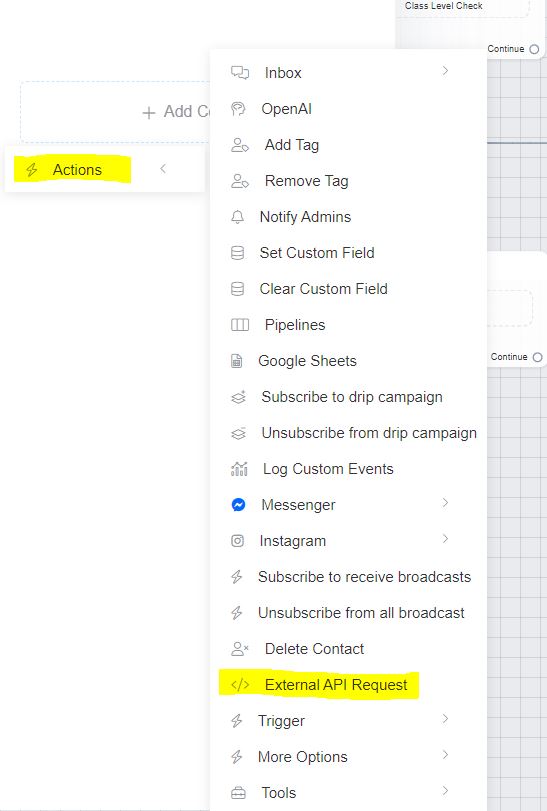
- In your Chitchatbot flow, click Actions > External API Request.
- Configure the endpoint URL, method (GET/POST), headers, and body.
- Test the connection to ensure your bot receives the expected response.
💡 Use Case: Fetch live currency rates, inventory status, or user profiles from your backend.
Our guide on how to connect your chatbot to HubSpot highlights how you can use external requests to connect to third-party software.
💾 2. Saving API Data to Custom Fields
Extract specific data from JSON responses using Response Mapping:
- After adding an External Request, open Response Mapping.
- Define a Custom Field (e.g.,
exchange_rate). - Use JSONPath to map the API value (e.g.,
rates.USDfor this currency API response):
{
  "rates": { "USD": 1.234 }
}
⚠️ Pro Tip: Validate your JSONPath using free tools like JSONPath Tester. Test to see if it extract as expected. Try without
$orxprefixes!
⚙️ 3. Accessing HTTP Status Codes & Full Responses
Capture technical details via special keywords in Response Mapping:
http_status_code: Save the HTTP status (e.g.,200,404).http_response_body: Store the entire API response.http_download_EXTENSION: Download files (e.g.,http_download_mp3for audio).
Example: Save http_status_code to a custom field, then add conditional logic
✨ 4. Dynamic Content: API-Powered Messages
Return ready-to-render messages from your API in a universal JSON format. Chitchatbot auto-adapts them for all channels (WhatsApp, Messenger, etc.).
Key Rules:
- Use this if you control the API.
- Structure your response with
messagesandactionsarrays:
{
  "messages": [{...}],
  "actions": [{...}]
}
📨 5. Dynamic Content Examples
Basic Text Message
{
  "messages": [{
    "message": {
      "text": "Hello world!",
      "quick_replies": []
    }
  }]
}
Multi-Message Sequence
{
  "messages": [
    {"message": {"text": "Step 1"}},
    {"message": {"text": "Step 2"}}
  ]
}
Image/Audio/File Attachment
{
  "messages": [{
    "message": {
      "attachment": {
        "type": "image", // or "video"/"audio"/"file"
        "payload": {"url": "https://your-file-url.jpg"}
      }
    }
  }]
}
Gallery (10 Cards Max)
{
  "messages": [{
    "message": {
      "attachment": {
        "type": "template",
        "payload": {
          "template_type": "generic",
          "elements": [
            {
              "title": "Product 1",
              "image_url": "https://...",
              "buttons": [...] // Up to 3 buttons/card
            }
          ]
        }
      }
    }
  }]
}
📱 6. WhatsApp-Exclusive Messages
Send WhatsApp-specific templates (e.g., lists, location requests) using WhatsApp’s native format. Chitchatbot auto-populates the to field:
{
  "messages": [{
    "messaging_product": "whatsapp",
    "type": "interactive",
    "interactive": {
      "type": "list",
      "body": {"text": "Choose an option:"},
      "action": {
        "buttons": [{ "title": "Option 1", "id": "FLOW_ID" }]
      }
    }
  }]
}
⚡ 7. Actions: Silent Backend Operations
Perform tasks without user interaction using actions:
| Action | JSON Snippet |
|---|---|
| Add/Remove Tag | {"action": "add_tag", "tag_name": "VIP"} |
| Set Custom Field | {"action": "set_field_value", "field_name": "status", "value": "active"} |
| Trigger Flow | {"action": "send_flow", "flow_id": "123"} |
| Assign to Human Agent | {"action": "transfer_conversation_to", "value": "human"} |
| Combine Actions | Include multiple objects in the actions array! |
🎯 8. Pro Tip: Embed Actions in Buttons
Use actions as button payloads (serialize to JSON string):
{
  "messages": [{
    "message": {
      "attachment": {
        "payload": {
          "buttons": [{
            "title": "Unsubscribe",
            "type": "postback",
            "payload": "{\"actions\":[{\"action\":\"remove_tag\",\"tag_name\":\"subscriber\"}]}"
          }]
        }
      }
    }
  }]
}
Ready to build smarter bots? External Requests and Dynamic Content turn Chitchatbot.ai into an integration powerhouse. Connect your CRM, payment gateway, or custom microservices – and deliver seamless, dynamic user experiences!


