In ChitChatBot, you can create your own translations for the built-in flows by exporting the content, translating it into your preferred language, and then importing the translated version back into your account. This allows you to customize the chatbot experience for your specific audience.
How to Enable This Feature
This feature is disabled by default because using AI for translations typically offers better results and significantly reduces manual work. If you’d still like to handle translations manually, please contact our team to enable this feature on your account.
Important Considerations
- Manual Effort:
Translating and maintaining separate flows in different languages can be a lot of work, especially for larger chatbots. - System & UI Limitations:
Some system-generated texts and platform UI elements may not be translated, even if you import your own translation files. - Better Alternative:
We strongly recommend leveraging AI-powered translations, which can handle dynamic and evolving content more effectively.
Best Practice for Multilingual Bots
If you have users who speak different languages (e.g., English and Spanish), you might consider:
✅ Creating separate flows for each language.
✅ Providing an option (like a language toggle) that lets users choose their preferred language.
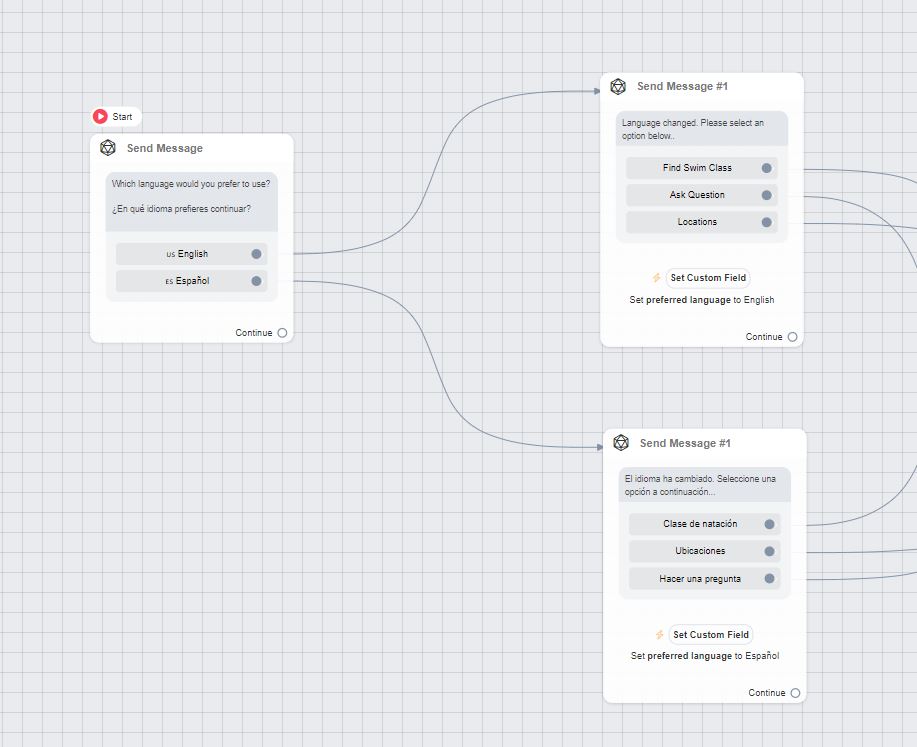
While this gives you more control, it can be labor-intensive and is generally only suitable for smaller or static bots.
Our Recommendation
For most use cases, building AI-powered bots with fewer, flexible flows is a better approach. This minimizes the need for manual translation work and ensures that your chatbot content remains accurate and up to date across languages. Every build is different, contact us and we’ll provide you with best practice advice based on your circumstances.


