

Bring Visuals to Life with AI-Powered Image Generation
This guide walks you through how to use the xAI integration to generate images dynamically within your chatbot flows. Whether you’re visualizing concepts, creating artwork, or enhancing responses with relevant images—xAI makes it easy.
🔗 Step 1: Connect xAI to Chitchatbot
- Log in to your Chitchatbot.ai account
- Go to Settings > Integrations > xAI
- Click Connect and enter the required credentials
You can access the API here: https://x.ai/api
🛠️ Step 2: Configure the Image Generation Flow
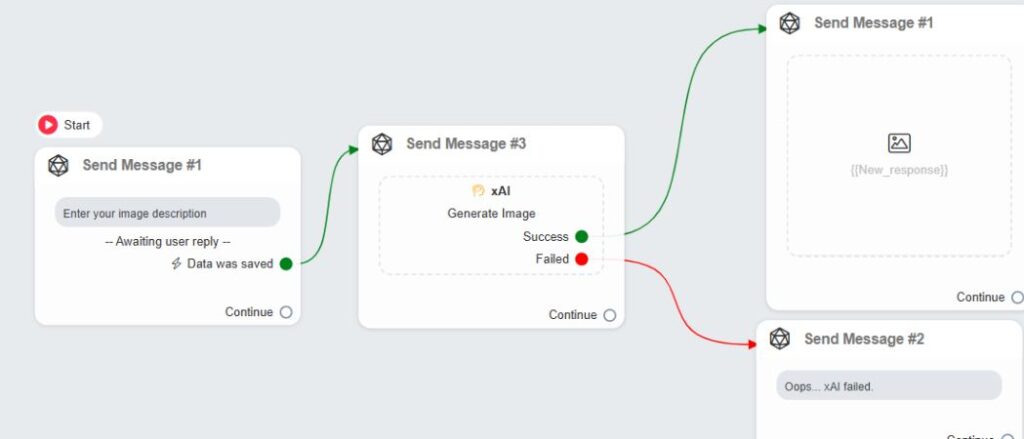
- Go to Flows > Create Flow or open an existing flow
- Add a new Action block and choose:
Action > xAI > Generate Image
🧾 Configure the Action
- User’s Message:
Enter the prompt or instructions for what image xAI should generate
(Example: “Generate a futuristic city skyline at night”) - Output Message:
Choose a custom field (e.g.,xai_generated_image) to save the image URL
This field will be used in an Image Block to display the result to users
🎯 Success & Failure Nodes
Each xAI action includes two key pathways:
- ✅ Success Node:
Trigger this path when image generation completes successfully
(e.g., show the image, thank the user, or offer to generate another) - ❌ Failure Node:
Trigger this path when xAI fails to generate an image
(e.g., display an error message, log the error, or prompt user to retry)
📦 Final Output
Once the image is generated and stored in a custom field:
- Add an Image Block and insert
{{xai_generated_image}}to show it - Optionally follow with user actions like feedback, sharing, or rerun
✅ Use Cases for xAI Image Generation
- Visualizing user ideas or descriptions
- Enhancing storytelling in chatbot flows
- Automating product mockups or creative concepts
- Interactive customer experiences
Ready to generate stunning visuals with just a prompt? Set it up in minutes using xAI on Chitchatbot.ai!
Let us know if you need help writing effective prompts or chaining image generation into more complex flows.


