

You can easily convert voice messages into text using OpenAI’s Whisper model integrated into Chitchatbot.ai. This is especially useful for building voice-based chatbots across social, web, and messaging channels.
🔗 Step 1: Connect OpenAI
Before using the speech-to-text feature, make sure OpenAI is connected to your account.
- Log in to your Chitchatbot.ai account.
- Go to Settings > Integrations > OpenAI.
- Follow the instructions to connect your OpenAI API key.
👉 Need help? Learn how to connect OpenAI →
🎙️ Step 2: Collect the Audio Input
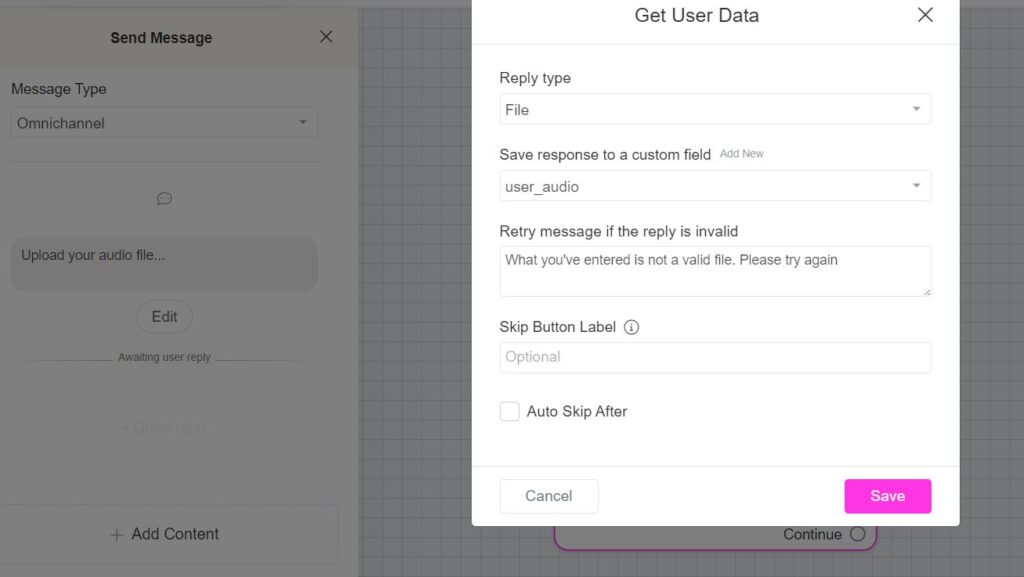
You’ll first need to collect the user’s voice input using a Get User Data block:
- Add a Get User Data step to your flow.
- Set the input type to Audio.
- Save the audio file to a custom field (e.g.,
user_audio).
💡 This step allows users to send a voice message to your chatbot.
⚙️ Step 3: Convert Audio to Text Using OpenAI
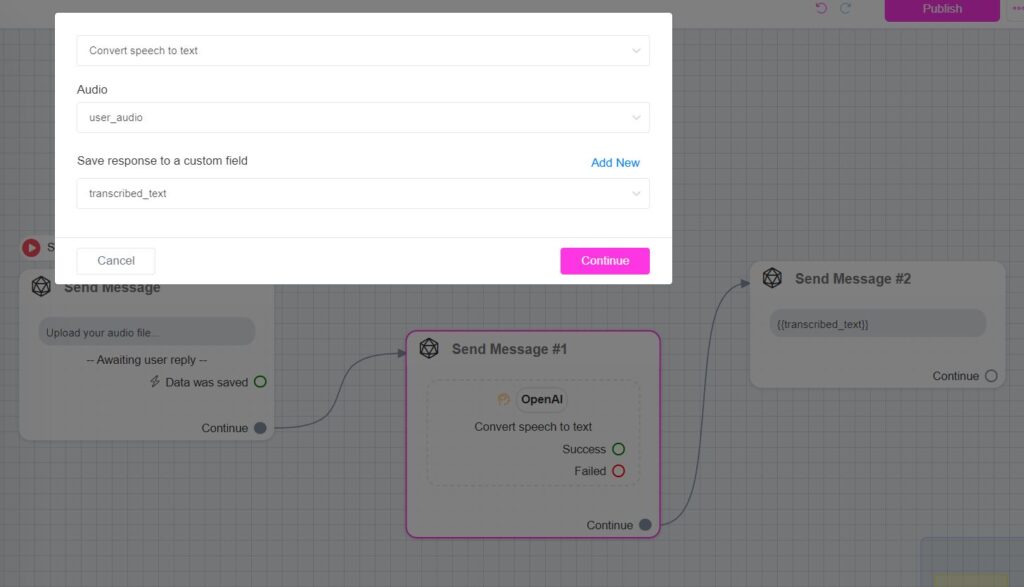
Now, use the OpenAI action to transcribe the audio.
- Add a new step:
Action > OpenAI > Convert Speech to Text - Configure the action:
- Input: Select the custom field where the audio was saved (e.g.,
user_audio) - Output: Choose a new custom field to save the transcription (e.g.,
transcribed_text)
- Input: Select the custom field where the audio was saved (e.g.,
🎧 This step uses OpenAI Whisper to transcribe the user’s voice into readable text.
💬 Step 4: Display the Transcribed Text
To show the converted text to the user:
- Add a Text block after the OpenAI action.
- Insert the output custom field (e.g.,
{{transcribed_text}}) into the message content.
✅ You can now display or reuse the text anywhere in your flow!
🔄 Compatible Channels
This feature works seamlessly across:
- 🌐 Website widget
- 📱 Social messaging platforms
- 💬 SMS and voice-enabled bots
💡 Common Use Cases
- Voice-to-text for support tickets or customer queries
- Audio feedback collection
- Voice-based data entry
- Hands-free chatbot interactions
- Language learning and pronunciation feedback
New inbox feature
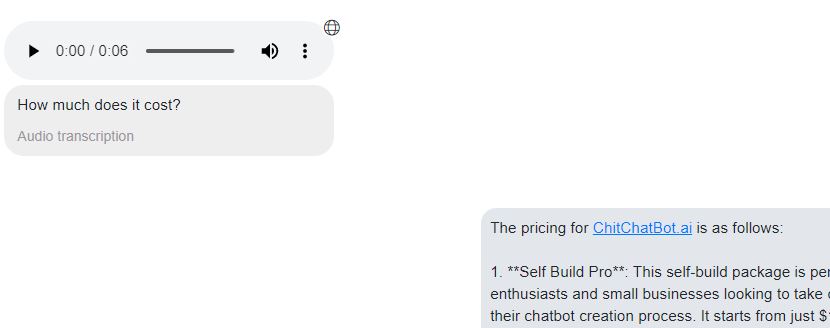
Audio Transcription in Our Inbox — Boost Your Business Productivity!
We’ve upgraded our inbox with a powerful new feature: automatic audio transcription. Now, when you receive audio messages, their text transcription will be displayed right inside the inbox.
How this benefits your business:
- Save Time: Quickly read audio content without needing to listen, helping you respond faster.
- Improve Accessibility: Easily access and review messages in noisy environments or when audio isn’t an option.
- Enhance Productivity: Streamline communication and reduce the chance of missing important details.
- Better Record Keeping: Keep written transcripts for reference and compliance.


