

Chitchatbot.ai integrates with OpenAI’s ChatGPT to help you deliver faster, smarter, and more cost-effective customer service—without needing to scale your human support team.
With this integration, your bot can instantly handle a wide range of customer queries across any connected channel—24/7—boosting satisfaction while saving time and resources.
🧠 Why Use ChatGPT in Your Chatbot?
- Respond instantly to customer messages—no wait time
- Handle common and complex queries around the clock
- Lower customer support costs by reducing manual workload
- Create more human-like, helpful conversations
- Let AI handle the basics while your team focuses on high-value support
🧩 The Key: A High-Quality Prompt
The “Business Information” prompt is the brain of your AI-powered chatbot.
Your prompt should:
- Be clear and detailed
- Include key facts about your products, services, policies, tone, etc.
- Guide ChatGPT on how to answer as if it’s part of your team
✅ A well-crafted prompt = a highly accurate and helpful chatbot
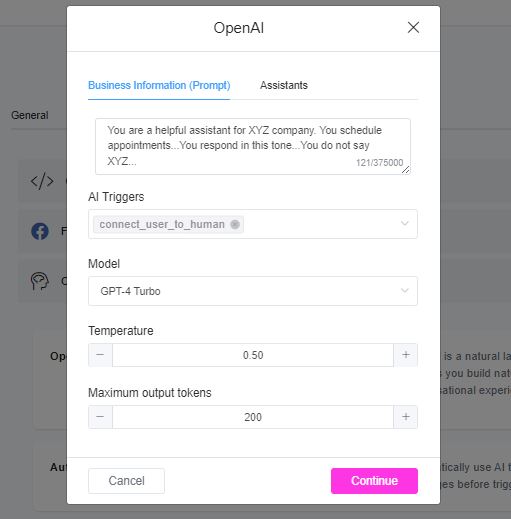
🔌 How to Connect ChatGPT to Chitchatbot.ai
- Get your OpenAI API Key
➡️ Create/Get API Key - Connect it in Chitchatbot.ai
- Go to
Settings>Integrations>OpenAI - Click Connect
- Paste your API key and save
- Go to
⚙️ Automation Priority Order
Once connected, Chitchatbot.ai automatically prioritizes bot responses in this order:
- Automated Responses (like keyword triggers)
- Dialogflow (if active)
- OpenAI (ChatGPT)
- Google Gemini (if enabled)
No manual setup is required—ChatGPT kicks in when others don’t match the user’s message.
🛑 Want to Manually Use ChatGPT Only in Flows?
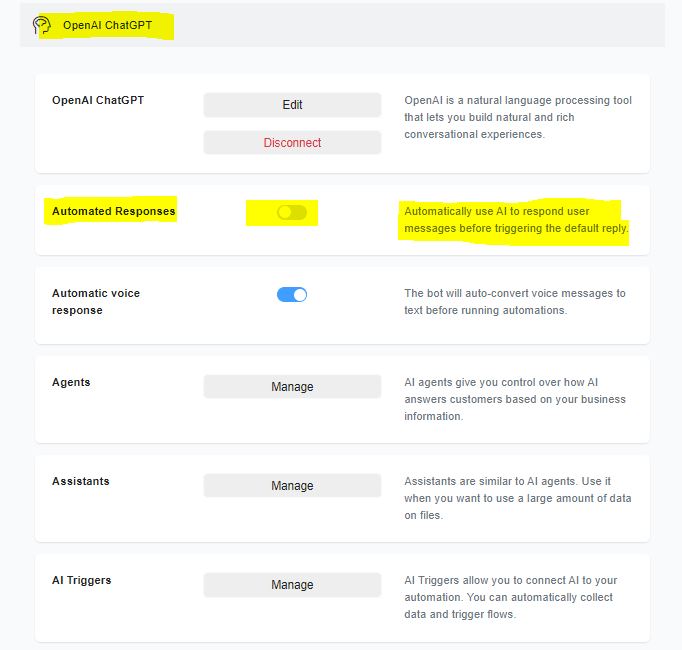
By default, ChatGPT replies automatically to incoming messages.
To disable auto-responses and use ChatGPT only in flows:
- Go to
Settings>Integrations>OpenAI - Toggle “Automate Responses” OFF
Now, ChatGPT will only be used inside flows where OpenAI actions are configured.
🔁 Triggering a Flow Using ChatGPT
You can combine AI replies with chatbot automation.
For example, ChatGPT can detect a specific need (like pricing or returns) and trigger a flow to guide users or capture data.
➡️ Refer to our AI Triggers Guide for setup instructions.
👤 AI-Human Handoff (Built-In)
When a user asks to speak with a real person (e.g., “talk to a human”), your bot will automatically:
- Stop AI automation
- Notify your live support team
- Transfer the chat to a human agent
No setup needed—this is built-in and ready to use.
✅ Best Practices for Success
- Keep your Business Info (prompt) updated with current details
- Test ChatGPT responses across real user queries
- Combine AI with Flows for guided support journeys
- Use AI for coverage—delegate sensitive or VIP issues to human agents


