Your phone rings. Your team is busy. The caller wants to book, ask a question, or find out whether you can help.
A useful voice agent answers, understands the request, and gets the caller to a clear next step. It might book an appointment, capture an enquiry, check information through an API, or transfer the call to someone who can help.
That is the goal. Not a voice demo that sounds impressive for ten seconds and falls apart when someone interrupts.
Our recommended starting point for a ChitChatBot.ai phone agent is AudioCodes for the voice connection, with Deepgram text-to-speech for the spoken replies. Build the conversation and actions in ChitChatBot, then test the whole journey over a real phone call.
Below, we walk through the setup and take a closer look at Retell Platform Voices, AudioCodes, MiniMax Voices, Fish Voices, ElevenLabs Flash, ElevenLabs Multilingual v2, OpenAI Voices, and Deepgram.
First, understand what you are choosing
These names do not all describe the same thing.
- ChitChatBot.ai runs your conversation flows, AI-agent behaviour, and connected actions.
- AudioCodes provides the telephony connection and speech-service integration. It is not a single TTS model.
- Speech-to-text, or STT, turns the caller’s speech into text.
- Text-to-speech, or TTS, turns the agent’s written reply into audio.
- A voice is the identity you hear. A model is the engine generating that voice.
- Retell Platform Voices are a voice library managed within Retell’s agent platform, rather than a standalone AudioCodes speech engine.
The recommended route in this guide looks like this:
Phone caller → AudioCodes → speech recognition → ChitChatBot conversation and actions → Deepgram TTS → caller.
Deepgram TTS does not automatically mean you are using Deepgram STT. Configure and test recognition separately.
Also, provider support is not interchangeable. A voice available in Retell is not necessarily available through AudioCodes or in your ChitChatBot account. Check the integration, model, region, and account entitlement before building around a particular voice.
Why even smart, fast voice agents can frustrate callers
Here is the honest part: a voice agent can still be frustrating, regardless of how intelligent the AI is or how quickly it responds.
Speed does not fix a misheard name. A more capable language model does not guarantee that it received the right words in the first place. And a natural-sounding voice does not make it less irritating to repeat yourself three times.
In the voice setup described above, the system interprets the caller’s audio and transforms it into text before the conversation engine responds. That adds an extra opportunity for misunderstanding compared with a typed message. Background noise, accents, overlapping speech, poor phone connections, and similar-sounding words can all affect the transcript.
If “Tuesday” becomes “Thursday”, the AI might give a perfectly sensible answer to the wrong request. Faster processing can simply deliver that wrong answer sooner.
Text is not immune to misunderstanding. But callers can see what they have written, correct it, and provide details such as names, email addresses, reference numbers, or postcodes without relying on speech recognition. They can also read the reply at their own pace.
Every use case is different. The right answer is not always a longer conversation with a voice agent. Sometimes, keep it simple.
Take a message, then follow up by text
For an after-hours enquiry or a non-urgent request, a short message-taking flow followed by AI-assisted text follow-up can be a better experience:
- Give a brief greeting. Explain that the caller can leave a message rather than work through a long automated conversation.
- Capture the request and callback details. Keep questions to the minimum and confirm any details the system is unsure about.
- Offer a text follow-up with permission. Use a configured SMS or messaging channel, subject to the caller’s consent and applicable requirements.
- Use AI to organise the message and draft or send the appropriate follow-up. Ask the caller to confirm unclear details, answer approved questions, or provide the next step.
- Hand off when needed. Give the team the context so the caller does not have to start again.
A greeting might be:
“Thanks for calling. We’re unavailable right now. Please leave your name and a short message. If you’d like us to follow up by text, please say so and confirm the number we should use.”
Message transcription can still contain errors. This approach does not remove that risk; it reduces the need for repeated live back-and-forth and gives the caller a written opportunity to confirm or correct the important details. Do not treat an uncertain transcript as permission to make a booking or update a record.
Choose a live voice conversation when it genuinely helps someone complete a task there and then. Choose message capture and text follow-up when the request can wait, details matter, or the caller would otherwise face a frustrating series of retries. Keep a human route available for urgent, sensitive, or unresolved requests.
The goal is a useful customer experience—not the most elaborate AI conversation.
Why we recommend AudioCodes with Deepgram TTS
For a first business deployment, this gives you a clear separation of responsibilities.
AudioCodes handles the phone connection. Its Live Hub and VoiceAI Connect products connect telephony and bots, with speech-provider integrations. ChitChatBot already has a documented AudioCodes connection route.
Deepgram handles the spoken output. Its Aura TTS family offers streaming speech and a voice catalogue with different accents and delivery styles. That makes it a sensible shortlist for practical phone conversations.
ChitChatBot handles what happens next. The agent can collect information, trigger a flow, call a connected service, or hand the conversation over.
Importantly, this is our recommended starting configuration—not a claim that it is universally the fastest or best-sounding stack. Caller language, regional availability, integration settings, and real-call behaviour should decide your final choice.
Deepgram’s AudioCodes integration guide explicitly describes a Deepgram speech-provider option for both STT and TTS. Start there rather than assuming you need to build a custom speech bridge.
How to create your voice agent on ChitChatBot.ai
1. Pick one job for the first version
Start with something specific:
- Capture an out-of-hours enquiry.
- Book a screening call for a recruiter.
- Answer approved service questions and offer a callback.
- Collect the details needed for an insurance quote review.
- Help a resident find the correct local-service reporting route.
Write down what a successful call means. “Booked an available appointment” is useful. “Had a natural conversation” is not enough on its own.
Define the boundaries too: what the agent must not promise, when it should transfer, and what happens when a connected system is unavailable.
2. Build the conversation and actions in ChitChatBot
Prepare your approved business information, greeting, intake questions, and next-step flows.
Keep the voice version shorter than the web-chat version. A caller cannot scan a paragraph or click a carousel. Ask one question at a time and confirm important details.
Where needed, connect the agent to actions such as:
- Saving a name, preferred time, or enquiry type to custom fields.
- Applying a tag for the team.
- Triggering a scheduling or availability-check flow.
- Marking a conversation for follow-up.
- Routing the enquiry to a team member.
See Built-in Conversational AI Actions for examples. Phone-call transfer is a separate voice-channel action: test that action and its destination, rather than assuming an inbox assignment transfers a live call.
For bookings, fetch actual availability before offering a slot. Confirm success only after the booking action succeeds. If it fails, offer a callback instead of inventing a confirmation.
3. Create the AudioCodes bot connection
Follow our Voice Automation with AudioCodes guide for the ChitChatBot-specific connection details.
The documented setup uses Bots → Add New Voice Bot → AudioCodes Bot API. AudioCodes product versions may instead show Bot Connections or slightly different labels.
Set the bot name and appropriate region, enter the ChitChatBot connection URL using the account details specified in the guide, and validate the connection.
Treat connection URLs containing account keys as credentials. Do not paste them into public screenshots, blog comments, or shared test documents.
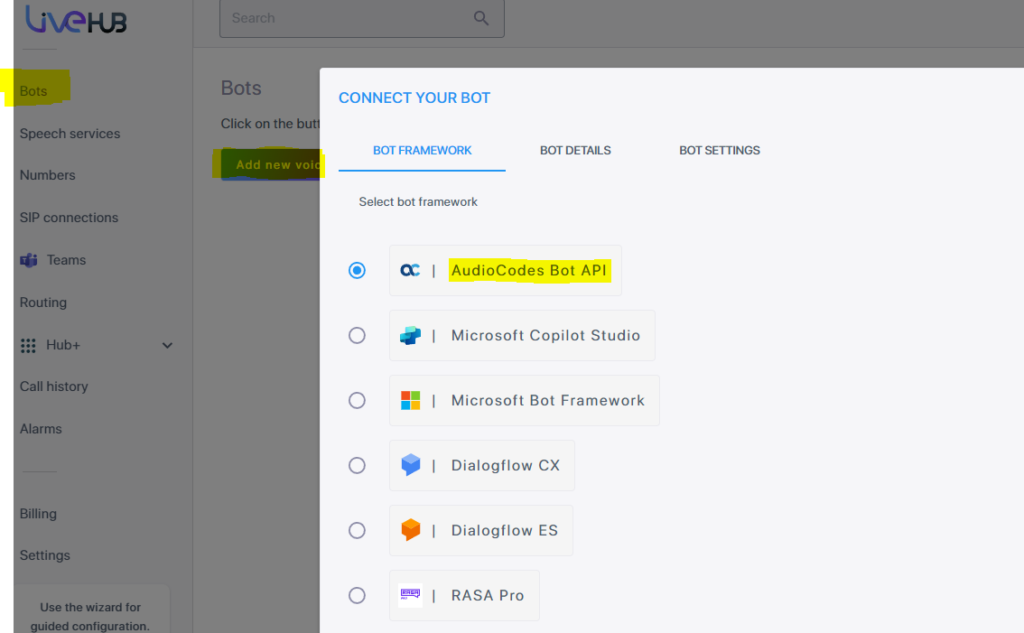
The existing setup guide includes screenshots; your AudioCodes interface may differ by product version.
4. Configure Deepgram as the speech service
In AudioCodes, create or select the Deepgram speech-service integration using the official integration instructions.
Add the required provider credentials through the private service configuration, then assign the service to the relevant bot connection for text-to-speech.
Choose an available Aura voice appropriate to your caller’s language and accent. For example, Deepgram’s catalogue lists:
aura-2-thalia-en: an American English voice described as clear and confident.aura-2-draco-en: a British English voice described as warm and approachable.aura-2-pandora-en: a British English voice described as smooth and calm.
These are examples from Deepgram’s catalogue, not a promise that every AudioCodes account exposes every model. Use the supported voice/model configuration for your deployment; consult AudioCodes’ speech-service documentation if you need advanced configuration.
Configure STT language and recognition separately. If callers speak British English but the recogniser repeatedly mishears local names and postcodes, changing the TTS voice will not fix that.
5. Route a phone number to the bot
Add a number or connect a supported existing telephony route in AudioCodes. Number availability, purchasing, porting, and SIP options depend on your account and country.
The ChitChatBot setup guide describes creating a routing rule with your phone number as the call origin and the bot as the call destination.
Begin with a test number or limited after-hours route. Keep your current human-answering path available while you validate the pilot.
6. Connect the voice channel and welcome flow
In ChitChatBot, the documented path is Settings → Channels → Voice → Connect, then select AudioCodes and enter the connected phone number.
Leave outbound calling disabled for an inbound-only pilot.
Set your welcome flow under Settings → Channels → Voice → Welcome. The current setup guide notes that without a welcome flow, the bot may wait for the caller to speak first.
A simple greeting:
“Thanks for calling Northside Services. I’m the AI assistant. I can help with bookings and general questions, or get a message to the team. What can I help you with?”
Disclose that the assistant is AI. If recording is enabled, add the notice and consent process required for your circumstances.
7. Test the complete call, not just the voice preview
Make real calls from a mobile phone. Test interruptions, corrections, silence, background noise, unclear names, and requests to speak to a person.
Check that the data saved in ChitChatBot is correct, the downstream action actually happened, and the caller heard the right confirmation.
Only expand the rollout once the first use case works reliably.
The TTS deep dive: which option fits which job?
1. Retell Platform Voices: a managed voice experience
Retell describes its Platform Voices as a curated library tuned for phone conversations, including pacing, fillers, conversational rhythm, and clarity at telecom bitrates.
The important operational feature is automatic TTS fallback within Retell. According to its documentation, you do not need to set a separate fallback plan for a platform voice. Third-party voices used through Retell require manual fallback configuration.
Retell can also route a platform voice to an underlying model suitable for the agent’s language. That reduces some provider-management work, but means you are choosing a managed experience rather than pinning every aspect of the speech engine yourself.
Best fit: teams evaluating a Retell-based deployment who want a curated voice and less fallback administration.
What to test: whether the chosen voice remains appropriate across supported languages, whether fallback changes the experience, and how it handles your actual names, codes, and interruptions.
ChitChatBot consideration: this is an alternative platform path to evaluate, not a voice you should assume can be selected in the AudioCodes connection. Retell’s documented features apply inside Retell.
Source: Retell Platform Voices.
2. AudioCodes: the integration layer, not one voice
“AudioCodes voices” usually means voices made available by the speech providers configured through AudioCodes.
AudioCodes lists integrations with providers including Deepgram, ElevenLabs, Microsoft, Google, and Amazon. The integration layer connects those speech services with your bot and phone infrastructure.
That distinction matters. Two agents using AudioCodes can sound completely different because they use different TTS providers, models, languages, or voice settings.
Best fit: a ChitChatBot phone deployment that needs a documented connection route and the ability to configure compatible speech services.
What to test: telephony routing, regional service availability, audio formats, interruptions, transfer behaviour, and the speech models actually exposed in your deployment.
Our recommendation: start with Deepgram TTS through AudioCodes, then compare another supported engine only if your pilot reveals a specific reason to change.
Do not assume that AudioCodes automatically inherits Retell’s voice catalogue or fallback behaviour. Those are separate products with separate configurations.
Source: AudioCodes Live Hub.
3. MiniMax Voices: language coverage and delivery controls
MiniMax offers speech-model families with standard and higher-quality variants, streaming options, and controls for delivery. Its current model documentation lists speech-2.8-turbo and speech-2.8-hd, with support for 40 languages and emotion controls.
For a live call, a Turbo variant is the sensible first candidate to test. For recorded introductions or longer narration, compare the HD variant. That is a practical shortlist, not an end-to-end latency guarantee.
Retell’s own comparison reports good pacing and spelled-out-word performance in its internal MiniMax tests. Treat that as provider-specific testing, not independent proof for your own agent.
Best fit: multilingual deployments or teams looking for a particular voice, dialect, or controlled delivery style.
What to test: your exact language and model combination, mixed-language sentences, spelled email addresses, appointment times, and pronunciation of local names.
Watch-out: a model supported directly by MiniMax may not be exposed by your chosen connector. Confirm the available model rather than selecting a voice by name alone.
Sources: MiniMax models and Retell’s provider comparison.
4. Fish Voices: custom voice identity and expressive speech
Fish Audio offers text-to-speech, voice cloning, and realtime streaming. Its current documentation lists the s2.1-pro, s2-pro, and older s1 models.
That makes Fish worth evaluating when a distinctive brand voice or custom voice identity is important. Streaming is relevant to live agents because it lets playback begin before the entire reply has been generated.
But a compelling voice sample is only the first test. Expression controls and model behaviour differ between generations; do not assume a tag or setting behaves identically across all Fish models.
Best fit: teams exploring a consented custom voice or a particular expressive style.
What to test: short transactional replies, emotional consistency, abrupt corrections, pronunciation, and how the voice survives phone-line compression.
Watch-out: community availability does not settle commercial rights. Verify licensing and obtain explicit permission for any cloned voice. Check production terms, data handling, and support arrangements for the exact service you use.
Source: Fish Audio capabilities and models.
5. ElevenLabs Flash: a strong low-latency shortlist
ElevenLabs Flash is designed for fast synthesis. Be specific about the version: Flash v2 and Flash v2.5 are not interchangeable.
ElevenLabs documents Flash v2.5 with 32-language support and approximately 75 ms model latency under its stated conditions. That number is not the time between a caller finishing a sentence and hearing the agent respond.
The complete response also includes speech recognition, end-of-turn detection, reasoning, tool calls, network transit, buffering, and telephony.
Best fit: live conversations where you want to test a low-latency model with ElevenLabs’ voice-library and accent options.
What to test: number pronunciation, stability on short replies, language availability for the selected version, and whether your connector supports the output format you need.
Watch-out: do not confuse a voice with its model. The same voice identity can behave differently on Flash and Multilingual v2. Compare them using the same script and phone connection.
Source: ElevenLabs TTS documentation.
6. ElevenLabs Multilingual v2: consistency and longer speech
Multilingual v2 is documented as a natural-sounding, consistent model with 29-language support and stability on longer generations.
It belongs on the shortlist for multilingual audio, longer explanations, and recorded content. For a live agent, compare its full response time against Flash rather than assuming the richer preview is automatically the better call experience.
A caller waiting through a long pause will not care how polished the next paragraph sounds.
Best fit: longer spoken explanations or multilingual content where voice consistency matters, subject to live-call testing.
What to test: transitions between languages, regional accent fit, long versus short utterances, and whether the agent can stop speaking promptly when interrupted.
Watch-out: TTS language coverage is not the same as your STT or agent-language coverage. All parts of the pipeline need to support the conversation.
Source: ElevenLabs model and language guidance.
7. OpenAI Voices: model choice changes the controls
OpenAI’s speech API includes gpt-4o-mini-tts, tts-1, and tts-1-hd. The model determines the available voices and behaviour.
With gpt-4o-mini-tts, OpenAI documents instruction-based control over aspects such as tone, speed, accent, and intonation. Its catalogue includes voices such as alloy, coral, sage, and shimmer; check the current model-specific list before choosing.
OpenAI notes that its voices are optimised for English, although the service can generate speech in other supported languages.
Best fit: deployments where you want to evaluate instruction-driven delivery and a relatively straightforward built-in voice catalogue.
What to test: whether your connector exposes speech instructions, pronunciation in the target language, streaming playback, and the precise model used.
Watch-out: using an OpenAI language model for the agent does not automatically select OpenAI TTS. Also, OpenAI’s Speech API and Realtime API are different integration paths. A setting available in one is not necessarily available in the other.
OpenAI explicitly requires disclosure that its TTS output is AI-generated. Make disclosure part of your greeting, not an afterthought.
Source: OpenAI text-to-speech guide.
8. Deepgram: our recommended starting TTS for the AudioCodes route
Deepgram’s Aura models offer voice-specific delivery styles and streaming speech. The current catalogue includes English accents such as American, British, Australian, Irish, and Filipino, alongside voices for other supported languages.
For a UK receptionist pilot, audition British English options such as Draco and Pandora. For an American customer-service flow, compare Thalia, Andromeda, or another suitable voice using your own script.
Do not choose from the descriptive label alone. “Warm” is not a measurement. Listen to the voice reading your business name, opening hours, addresses, and appointment confirmations.
Best fit: a ChitChatBot + AudioCodes pilot prioritising a documented speech-service integration and practical spoken replies.
What to test: the Aura generation available in your connector, accent and language fit, first-audio delay, pronunciation, and interruptions.
Watch-out: Aura TTS generates speech; it does not decide when the caller has finished speaking or whether a booking is valid. Those behaviours come from the rest of the agent and integration.
Our default recommendation remains AudioCodes + Deepgram TTS, with separately tested STT and a tightly scoped ChitChatBot flow.
Source: Deepgram voices and languages.
How to compare voices without getting misled
Use the same test sentences, caller scenarios, connection, and destination country for each candidate.
Record these measurements separately:
- Time to first audio: from requesting synthesis to receiving playable speech.
- Full-turn response delay: from the caller finishing to the agent starting its reply.
- Interruption behaviour: whether playback stops when the caller speaks.
- Task completion: whether the enquiry, booking, or handoff actually succeeds.
- Pronunciation and repeat requests: how often the caller needs clarification.
Test normal calls and deliberately difficult ones. Track median delays and slower-tail delays, not just the fastest demonstration.
Audio format matters too. A voice that sounds excellent in a high-quality browser preview can lose detail over an 8 kHz telephone route. Confirm the formats accepted by the provider and gateway, and listen on the actual line.
Do not set one universal “best voice” score. A calm British voice for insurance intake and an energetic voice for fitness enquiries may need different shortlists.
A practical voice-agent prompt
Adapt this to your business and the actions you have actually connected:
You are the disclosed AI phone assistant for [Business Name].

Help with approved general questions and [specific pilot task].
Speak naturally in short sentences. Ask one question at a time.
Do not read markdown, URLs, internal field names, or tool instructions aloud.

Confirm names, dates, times, and important details before taking action.
Use the connected tools to check current information.
Only confirm a booking or update after the tool reports success.

If a tool fails, explain that you cannot complete the action right now
and offer the configured human handoff or callback route.

If the caller asks for a person, use the tested transfer flow.
Do not claim a transfer or callback is complete unless it is confirmed.
Do not provide advice or make decisions outside the approved scope.
This does not replace channel configuration. A prompt asking the agent to stop speaking cannot fix a gateway that buffers an entire reply before playback.
Before you send real callers to it
Use this launch checklist:
- The agent identifies itself as AI.
- Business information and fallback answers are approved.
- Important details are repeated back.
- Actions have success and failure branches.
- Transfer destinations and out-of-hours behaviour are tested.
- STT and TTS work in the intended languages.
- Recording, retention, and consent settings fit your requirements.
- Voice cloning has explicit permission and commercial rights.
- Outbound calling stays off unless deliberately configured with the necessary permissions and consent.
- Usage alerts and a human fallback route are in place.
Budget for the whole stack: platform access, phone numbers, calls, STT, TTS, language-model usage, connected services, and any setup or management work. Compare cost per successfully handled task—not just cost per generated character.
The short recommendation
First decide whether callers need a live conversation at all. For some enquiries, a simple message-taking flow followed by AI-assisted text follow-up is the better starting point.
If a live voice agent fits the job, start here:
One clear task. AudioCodes for the phone connection. Deepgram for TTS. A tested welcome flow, verified actions, and a working human handoff.
Then compare other voices against a real requirement: a specific accent, language, brand identity, delivery style, or operational feature.
The best approach is the one that helps callers get something done with the least frustration—whether that is a voice conversation, a message and text follow-up, or a person.
Want help building the complete flow? Book a voice-agent strategy call or explore ChitChatBot voice automation.
Sources and availability notes
Provider documentation was reviewed for this article on 7 October 2026. Model names, language coverage, controls, and account availability can change. Provider capabilities are not a guarantee of availability in every ChitChatBot, AudioCodes, or Retell deployment.
- ChitChatBot: Voice Automation with AudioCodes
- AudioCodes Live Hub
- Deepgram: AudioCodes speech-service integration
- Deepgram: Aura voices and languages
- Retell: Platform Voices
- Retell: TTS provider comparison
- MiniMax: Speech models
- Fish Audio: Capabilities and models
- ElevenLabs: Text-to-speech models and languages
- OpenAI: Text-to-speech